🚀New from LaserTagFun · Free · Gamepads and phones too
LaserWings: fly the canyons, lock on, tag them all
A flying game for kids on a desert planet, with a laser on every wing. Dive into deep canyons, chase the other pilots and tag them. Nobody gets hurt: a tagged wing just warps home and flies back in.
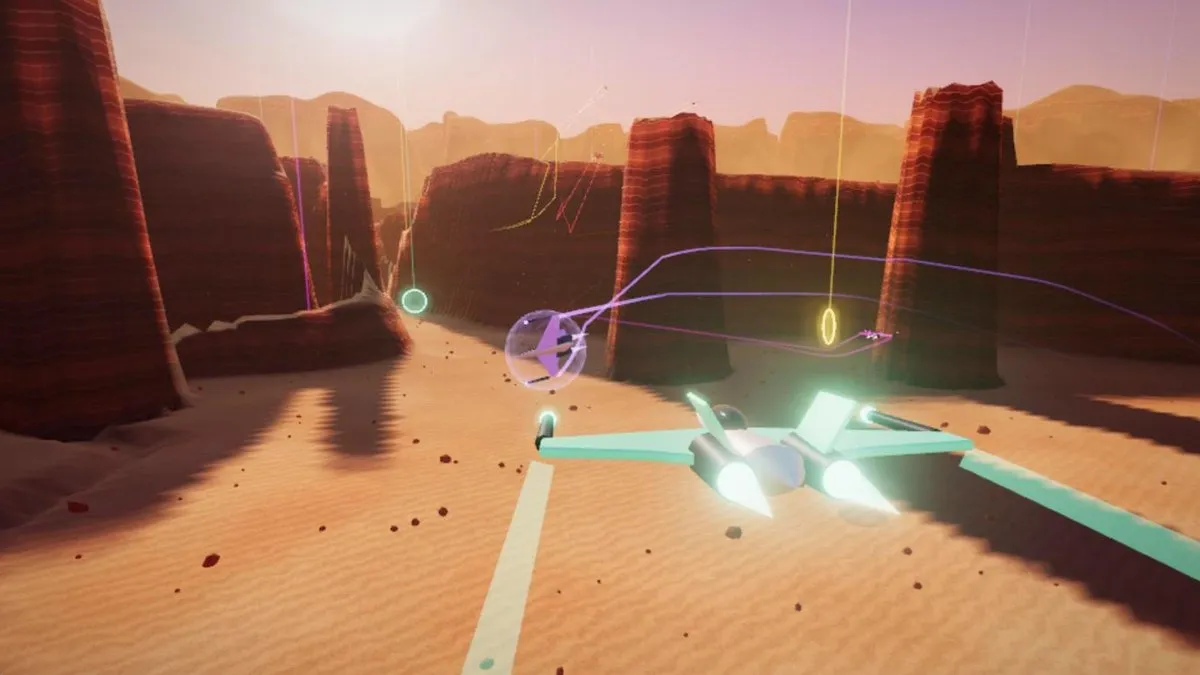
How a match works
Eight wings take off together: you and seven others, robots or friends. A match lasts three minutes, and whoever tags the most wings wins. Your place, your tags, your shield and the clock are along the top of the screen, the scoreboard is on the left, and a radar on the right shows where everybody is.
Every laser that hits you drains your shield. When it is empty you are tagged: your wing warps home and flies back in about three seconds later, and whoever tagged you gets the point. Stay out of the fight for a moment and the shield charges back up by itself.

🎮Controls
- Keyboard
- ← and → to turn: the wing banks by itself and flies straight when you let go. ↓ to climb, ↑ to dive. Space or X for the lasers, F or Z for a seeker, Shift to boost, C to brake, P to pause, Q or Esc to quit.
- Gamepad
- Left stick to fly. A or RT for the lasers, B or RB to boost, X or LT to brake, Y or LB for a seeker, and the right stick for the rudder.
- Phone or tablet
- Turn it sideways. A stick on the left flies the wing, and lasers, boost, brake and seeker each have a button.
Lock on, then fire
Hitting a wing that twists and turns is hard, so LaserWings does what fighter jets do in the films: it locks on. Put a wing inside the dashed circle in the middle of the screen and a yellow box closes in on it, beeping faster and faster. Half a second later it turns into a red LOCKED diamond with the pilot’s name and distance.
Once you are locked, every laser you fire curves onto the target, and the lock holds as long as your nose stays roughly on it. Without a lock the lasers fly straight. Hold the trigger too long and they overheat for a moment. A lock also lets you send a seeker, which chases the wing on its own: you start with two and carry up to three.
🚨If a robot locks on to you, the screen warns LOCKED ON — BREAK AWAY! Turn hard to shake it off, and drop into a canyon, where seekers can’t find you.
Fly inside the canyons
The planet is cut by deep, winding canyons, and the best part of the game happens inside them. Below the rim seekers can’t find you, your boost refills fast and your lasers cool quicker. Half the robot pilots like it down there too, so a canyon run is often a chase between rock walls and stone pillars.

Rings, rocks and the sandstorm
Glowing rings wait on the canyon floors. Fly through one for a prize, shown by the icon inside it: 🛡️ puts your shield back to 100%, 🔱 gives you a triple laser for 12 seconds, ⚡ fills your boost and 🎯 gives you a seeker. Brushing a rock costs a little shield, and flying straight into one tags you, so the game shouts PULL UP! when the ground gets close. Fly too far out and a sandstorm turns you back; fly too high and the air gets too thin.
⏱️The game tells you when the last 30 seconds start. That is the moment for the seeker you have been saving.
Easy steering or Pro
LaserWings starts on Easy steering: the arrow keys steer, the wing banks into the turn by itself, and it flies straight and level the moment you let go. Pull back (↓) to climb, like a pilot does, or swap it in Settings so ↑ climbs. When you feel ready, Pro steering lets you bank and pull like a real fighter, and you can fly with the mouse too.

Robot pilots, friends and the hall of fame
On your own you fly against seven robot pilots: Blaze, Nova, Pip, Kiwi, Luma, Rex and Mochi. Pick Easy, Normal or Ace: it changes how hard they chase you and how well they aim at you.
To fly with friends, open a new sky and send them its four-letter code or the invite link, or open a public sky that anybody can join from the list. Up to eight pilots fly together, and robots fill the empty places. The title screen shows the champions of the week and the best scores.
Five tips for your first flight
- Lock on before you fire: put a wing in the dashed circle and wait for the red diamond.
- Fire in short bursts, so your lasers never overheat.
- A seeker on your tail? Dive into a canyon.
- Shield low? Look for a green ring on the canyon floor.
- When a wing shoots past you, brake: you turn much tighter.
For parents
LaserWings is made for children. Nobody gets hurt and there is no blood: a laser hit is a flash of light on a shield bubble, and a tagged wing warps home and flies back in. Flying alone needs no account, no download and no name.
Flying with friends asks for a made-up name, which only the people in that sky see. There is no chat. The hall of fame only lists names that were kept on the home page, and the game shows no ads.
Ready for take-off?
Play LaserWingsFree, in your browser, with a keyboard, a gamepad or a touch screen · English, Español, Italiano